
Enhancing The EGA Color Palette
Missed Opportunities in 16 Colors
I've occasionally explored some alternate universes to see how games could have looked had the game or hardware developers made some different decisions. There's very little point to this exercise, but it can be interesting to see what might have been. So far I've only done this in the CGA graphics realm, notably wondering what some CGA games might look like if they used a different color palette instead of the choice actually used by the game. Now it's time to move on to the next standard, EGA, and take a look at an alternate EGA universe where some better options are available. EGA improved appearances over CGA greatly by allowing 16 colors at a time on the screen from a total of 64 colors. But, for most games, not all 64 colors could be selected from; that was only possible in the 640x350 graphics mode with most games using either 320x200 or 640x200. In this article we'll take a look at how things might have been if this limitation didn't exist.
The Story So Far
Why Does EGA Have A Palette Limitation in 200 Line Modes?
If you're already familiar with PC graphics standards and why EGA is the way it is, you can probably just skip ahead a bit; otherwise, here's a little background. When the PC was first released, if you wanted graphics or text in color you needed the Color/Graphics Adapter (better known as CGA). This card had a palette of 16 colors, and in graphics modes you could get 4 of those colors at a time with 320x200 resolution or 2 colors at 640x200. In 1984, the Enhanced Graphics Adapter (better known as EGA) was released to improve the PC's color graphics. This card allowed all of those 16 CGA colors on the screen at the same time in graphics modes at the same pixel resolutions CGA offered, plus it added a new 640x350 graphics mode amongst many other new features and improvements. One of these new features was an overall larger color palette consisting of a total of 64 colors and not just the same 16 found with CGA. For compatibility, the default 16 colors matched (more or less) those of CGA while the remaining colors were all new! However, in order to accomodate the full palette of 64 colors the monitor connector pinout needed to be changed to allow for some additional bits used by the new color scheme. Instead of the RGBI scheme CGA used which required only 4 bits, EGA represented colors with 6 bits; 2 bits each for red, green and blue. This would be a problem for existing CGA monitors that were expecting bits to be for the old color scheme.
Because this change would have rendered existing CGA monitors incompatible with the EGA card, something had to be done; taking a route that would allow for backwards compatibility made a lot of sense as color monitors were very expensive back then, and the odds of someone wanting to upgrade their graphics adapter to EGA without being forced to buy a brand new monitor as well were pretty high! Additionally, the EGA card was not able to detect what type of monitor it was connected to, so having the card automatically switch into a CGA compatible mode wasn't possible (although interestingly a few later third party cards could apparently do this). The ultimate solution IBM devised was to keep the existing CGA compatible pinout for 200 line modes which allowed compatibility with CGA monitors and to reserve use of the new pinout needed for all 64 colors for only the 350 line modes which would require an EGA monitor. So this leaves us with the situation we have where only the default 16 colors can be used in 200 line modes but all colors are available in 350 line modes.
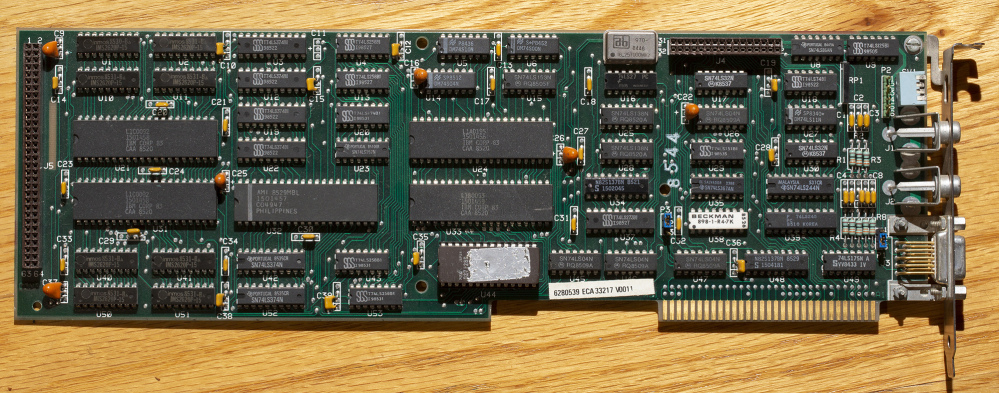
Although EGA sported that fancy new 640x350 resolution (pretty sharp and detailed for the time) and some games (especially later on) did use it, 320x200 was the mode most commonly found. There were several reasons for this; that mentioned compatibility issue was one. Especially early on in EGA's life too many people would not have upgraded to an EGA monitor leaving the 350 lines modes unavailable. Making sure as many EGA users as possible could run the game with 16 colors (any 16 colors) was likely deemed important. Ease of converting the graphics was another; when other versions of the game used 320x200 graphics, keeping that same resolution when porting the game to EGA made the process easier and cheaper (especially given that funky pixel aspect ratio for the 640x350 mode). Memory usage was another issue; at 640x350 resolution early EGA cards with only 64 KB video RAM could actually only display 4 of the 64 colors at a time! You needed to upgrade the card to at least 128 KB to get 16 colors at a time with this resolution. Not as much of an issue later on, but many early EGA adopters wouldn't have upgraded cards. And finally we have performance; more pixels to move around will slow the works down on computers that really didn't have a lot of resources to spare. And, really, 16 colors at 320x200 was already quite an improvement over what CGA offered even if it was just the CGA style colors.
I think the opportunity that IBM missed was to make the card configurable, say via a jumper or DIP switch. This was even already done to an extent. The IBM EGA card did have DIP switches to allow for that compatibility with CGA monitors (this would put the card into 200 line mode even for text modes which would otherwise use a new font for 350 lines) or for compatibility with monochrome monitors (allowing the EGA card to be a competitor to the Hercules Monochrome card). Since the card already needed to be configured when installed, it doesn't seem like too much of stretch to me to simply add on to this existing functionality the ability to use all 64 colors depending on the monitor type connected. I make it sound simple enough, but I'm guessing behind the scenes this change would have taken some additional work, time, and/or components which would have added to the overall cost. I'm still convinced this really should have been a feature though. But what if we did have this ability built into the original IBM EGA card? I'm guessing that many games released would look exactly like they do today; since there is still the scenario where not every EGA/monitor combination allows access to the extra colors many games would have used the lowest common denominator and simplified development by supporting the standard 16 colors only. But, I think many of the top tier titles (especially later on in EGA's life) would very likely have made great use of the extra colors. Some games could have supported both options, with later titles possibly even requiring an EGA monitor for the extra colors.
The Full EGA Palette
Before getting to some mockups, there's one last housekeeping item; what colors do we actually have available? Here's the complete EGA palette showing all 64 of the colors we have to work with:
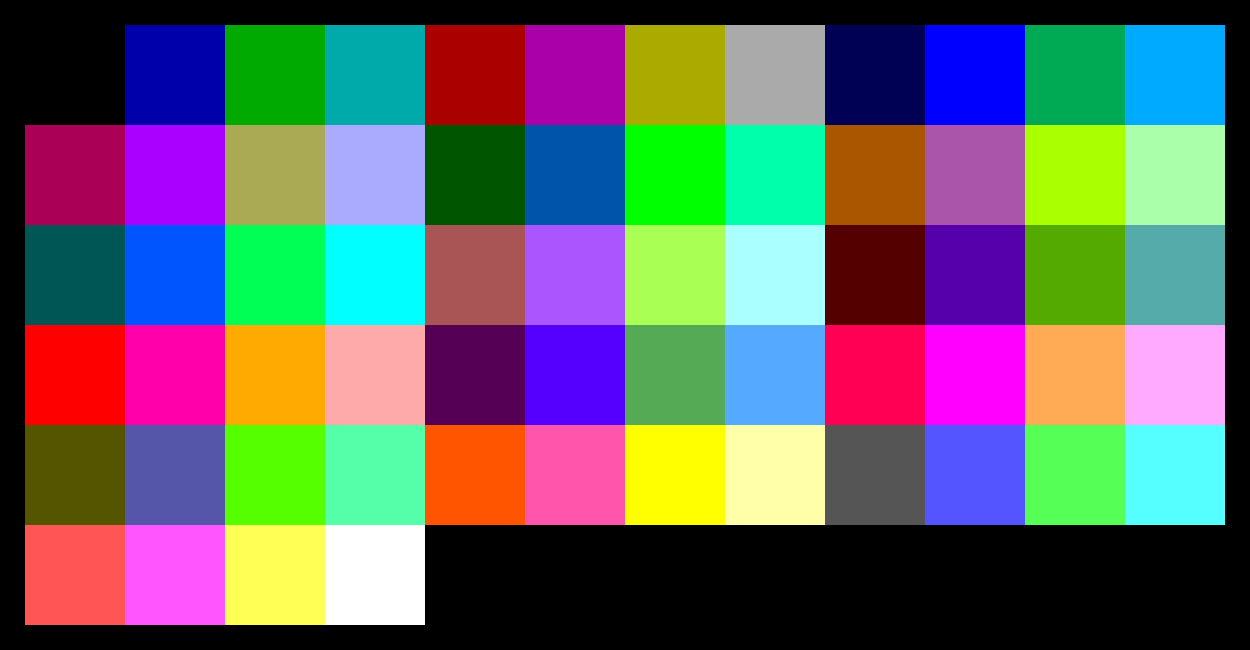
That's a pretty nice set of colors we have there! There's definitely some more flexibility available for different art styles with some more pastels, dark colors, vibrant colors, and so on so we're not always stuck with the same color no matter the art style. Anyway, now that all that background info is out of the way, it's time for the “what if” scenarios: how about a few mockups of how a few games may have looked had this feature actually existed.
The Fantasy EGA Screenshots
There are several possible ways EGA graphics could have looked different. Below I attempt to use Photoshop to create some screenshots showing the results. Assuming I didn't make any mistakes, all of the hypothetical EGA screenshots shown would have been possible on an EGA card if 16 colors could be chosen from the full 64 color palette. Now whether or not the game engine would have supported this or would the developers have done it is a different matter, but in theory it could have been done!
The Palette Swap
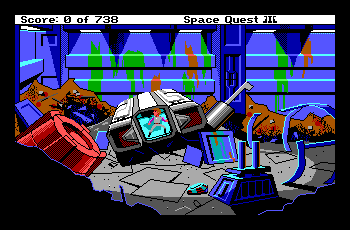
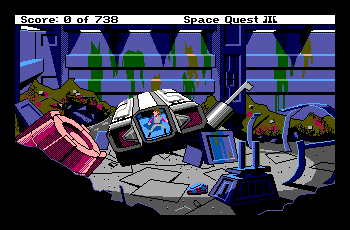
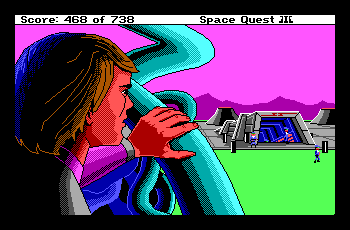
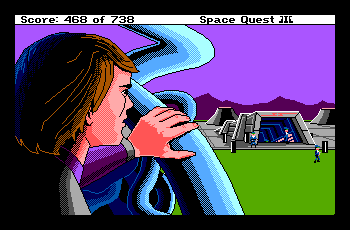
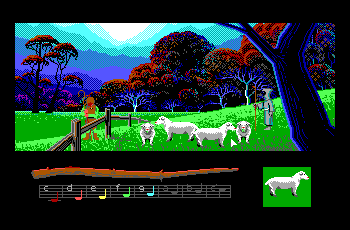
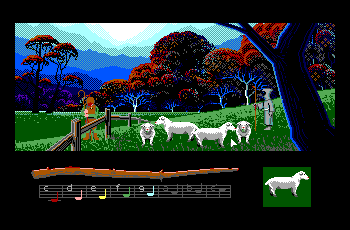
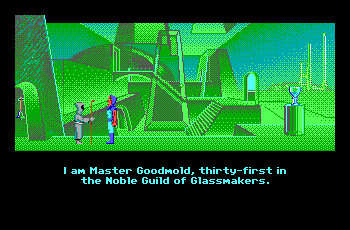
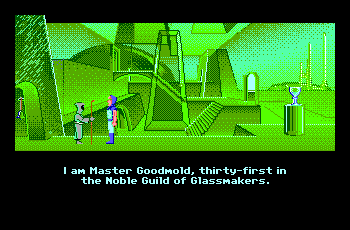
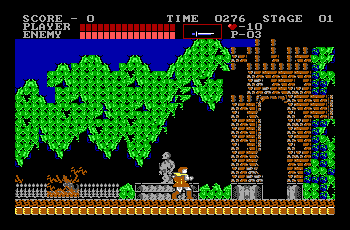
The easiest approach is taking the existing graphics and simply changing the color palette to use some colors outside our usual, default 16. And that's exactly what this first set of screenshots does; swap in a few different colors.
| Space Quest III: The Pirates of Pestulon | |
| Actual EGA Palette | Hypothetical EGA Palette |
 |
 |
 |
 |
| Loom | |
| Actual EGA Palette | Hypothetical EGA Palette |
 |
 |
 |
 |
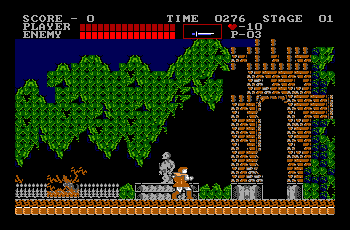
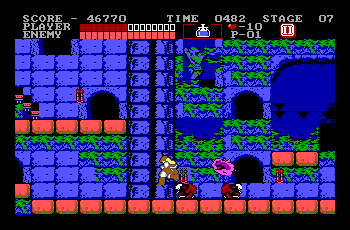
| Castlevania | |
| Actual EGA Palette | Hypothetical EGA Palette |
 |
 |
 |
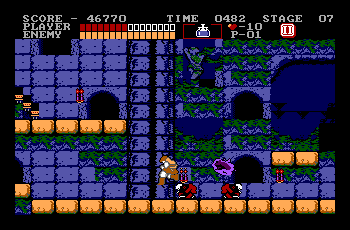 |
I find the additional colors can come in handy when you need some dark or earthy tones; the standard 16 are just too bright and vibrant.
Redesigned Graphics
In the real world had the full 64 color palette available it's far more likely the graphics would have been designed differently from the ground up rather than simply changing around the palette like the previous examples. For games ported from the Amiga or Atari ST (which often used 320x200 16 color graphics) the PC version could have more closely resembled the original. This is a little harder to simulate (and probably would turn out better if someone with more artistic skills made the mockups). But here's an attempt at some samples where the graphics were updated beyond just a palette swap, for instance, to more closely match Amiga or Atari ST versions of the game.
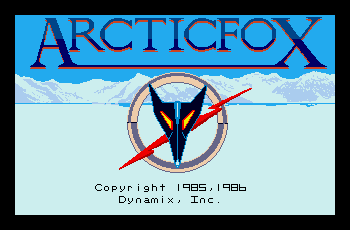
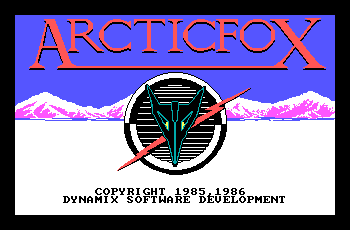
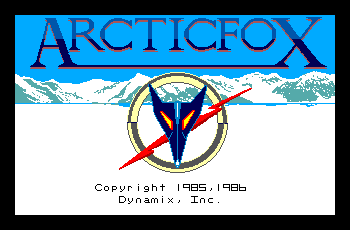
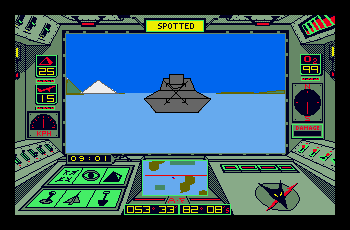
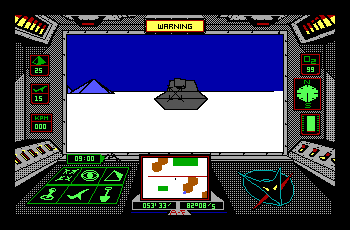
First, here's ArcticFox; perhaps an odd game to pick as it doesn't even support EGA graphics, but it does have 16 colors on a Tandy 1000. It wasn't uncommon for the Tandy and EGA graphics for a game to look identical, so we'll just assume had there been an EGA version it would look the same as the Tandy version. ArcticFox took full advantage of the Amiga's capabilities including 32 color graphics, so ports to other systems of the era wouldn't be able to keep up. The Atari ST could, like EGA, only display 16 colors at a time but it had an overall palette of 4096 colors just like the Amiga. This would let ArcticFox on this system look pretty close to the Amiga version! In our hypothetical EGA world we'll still fall short as there aren't exact matches for the ST colors, but we can put together something far closer than the actual EGA palette would have allowed. Here's a comparison of the Atari ST version, the actual Tandy 1000 version, and our hypothetical EGA version with graphics based on the Atari ST.
| ArcticFox | ||
| Atari ST | Tandy 1000 | Hypothetical EGA Version |
 |
 |
 |
 |
 |
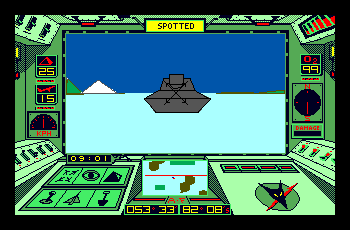 |
Not exact, of course, but much closer! If we really wanted to get wild and crazy, we could even take the Amiga version, cut down the number of colors, and try to match it with our EGA palette.
| ArcticFox | |
| Amiga 1000 | Hypothetical EGA Version |
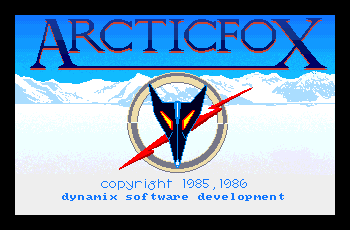 |
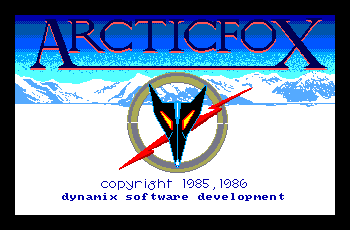 |
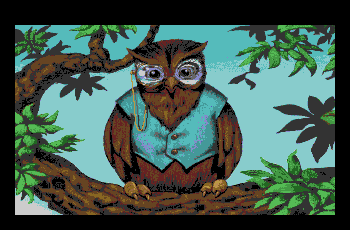
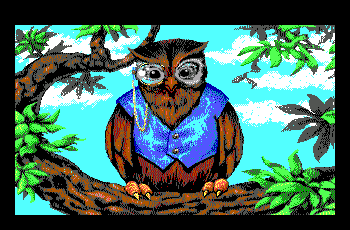
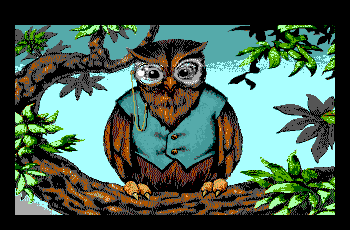
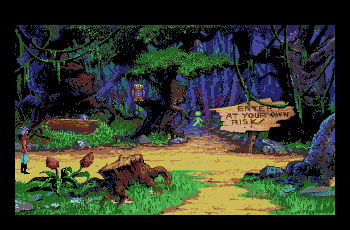
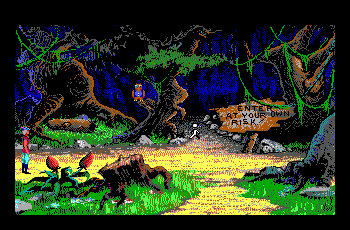
Even after VGA had been around a while, 16 color games still hadn't fully gone away yet. King's Quest V was Sierra's first adventure to support 256 color MCGA and VGA graphics. However, Many computers at the time were not capable of running this version; it required a high density disk drive, a faster 80286 processor, a hard disk, and of course MCGA or VGA graphics capability. As there were a lot of computers out there that didn't meet one or more of these requirements, a 16 color version was also released. An Amiga version also came along later, with the graphics for this version reduced to 32 colors for the Amiga's OCS/ECS chipsets. Needless to say, reducing the colors from 256 to either 32 or 16 degraded the quality; this was especially noticable with the 320x200 resolution which made dithering stand out more than if higher resolutions had been available. But it definitely needed to be done; the Amiga 32 color version was, of course, closer to the original; the 16 color EGA/Tandy version was tweaked a lot by hand to make the results look as good as was possible within the limitations. As expected, with our extra colors I think we can make the 16 color version look much better than it actually was even if it's still a far cry from VGA. Here's a way those extra colors could maybe have been put to use...
| King's Quest V | |
| 256 color MCGA/VGA Version | |
 |
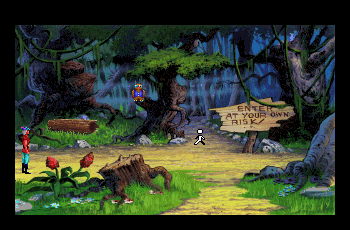 |
| King's Quest V | ||
| Amiga | Actual EGA Version | Hypothetical EGA Version |
 |
 |
 |
 |
 |
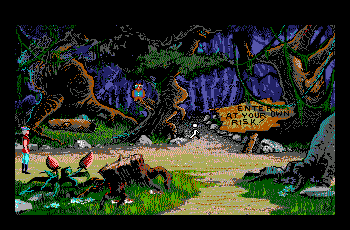 |
With many games, including adventures such as King's Quest V, one of the difficulties is some of your 16 colors need to remain fixed no matter what the scene is. The first shot with the owl I could repurpose any and all of the 16 colors offering some more flexibility, but on other screens which have our main character or a menu some of the colors need to always remain the same so these elements don't change from screen to screen. In King's Quest V, our hero consists of a whopping 9 colors leaving not much room to tinker with! My hypothetical EGA version shown above is sort of mashup of the actual EGA version and the Amiga version with the colors reduced to just 16 and selected from the full EGA palette. Even with our extended EGA palette, I found there still aren't a lot of shades of brown; this made it tough to deal with Cedric, our brown owl, and the many browns that would have been ideal for the trees and ground throughout the game. Once again, the hypothetical version is relying on my artistic skills; in a real world, Sierra's artists would most likely have done a better job!
Third Party EGA Cards
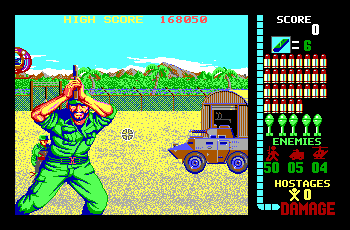
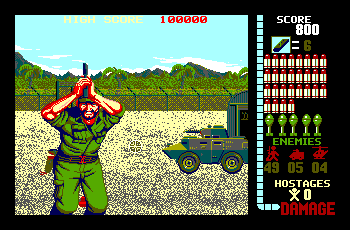
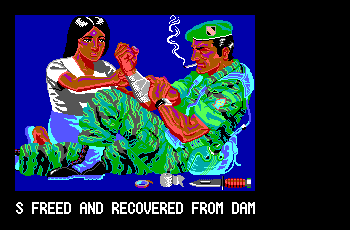
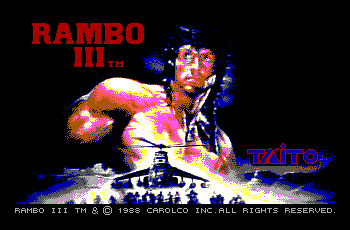
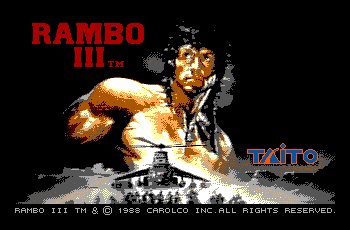
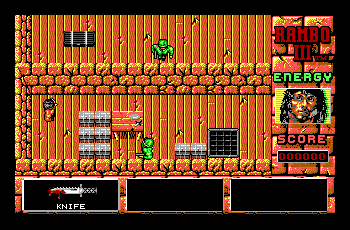
Lastly, there actually are a very small handfull of games that make use of all 64 colors in 200 line modes! While this wasn't possible on IBM hardware it also wasn't unusual for other hardware developers to improve upon IBM's initial offerings in both features and price. As such there actually were a handfull of third party EGA cards and monitors that did allow access to the full palette. Most notable are EGA cards from Boca and Paradise which were supported by a few games. In these cases, we don't have to imagine what the developers would have done; we can see the results! Here's some samples from the actual games (and not my mockups) where the full EGA palette is used at 320x200 resolution.
| Operation Wolf | |
| Standard IBM EGA | Boca/Paradise EGA |
 |
 |
 |
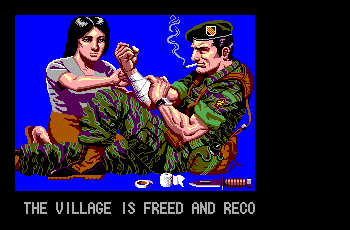 |
| Rambo III | |
| Standard IBM EGA | Boca/Paradise EGA |
 |
 |
 |
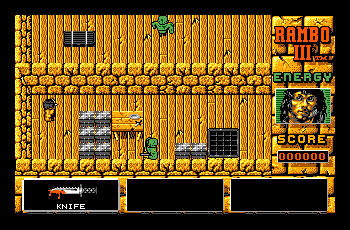 |
Too bad more developers didn't take advantage of those cards; they probably weren't common enough, and once VGA came along efforts started to shift to that much more advanced standard. This mode doesn't even work on VGA cards as it was unique to these specific EGA cards. But it does show that hardware supporting this technique was possible. This wasn't the first or last time where third party hardware either improved upon or offered for less cost an equivalent of what IBM introduced (a big part of the success of the PC/Wintel platform is due to this).
The Wrap-up
That's All Folks!
That's all the mockups for now. Hopefully you can see that being able to select 16 colors from a larger palette could really affect the quality of the graphics. Many Amiga games and Atari ST games only use 16 colors at 320x200 resolution just like EGA. But with a vastly larger overall palette to choose from, those versions end up looking significantly better (sometimes to the point where it's not even immediately obvious that there's only 16 colors at a time being used). With 64 colors total EGA still falls short of the 4096 possible on the Amiga and ST, but it did come out first by roughly a year. And, strange as it sounds, had all 64 colors been available with EGA some Amiga and Atari ST games actually would have looked better too! It wasn't unheard of for games originating on the PC to be ported to the Amiga/ST and use colors that were very close to the default EGA colors; Sierra On-Line did this a lot with their adventure games as did some other companies. Usually a disappointment for owners of these machines, but if EGA looked better, those ports would assuredly have copied the better colors. As with my hypothetical CGA screenshots before what, exactly, is ’better‘ is certainly up for debate and you may or may not agree with my color choices; but hopefully even if my version doesn't look better it illustrates how EGA could have offered some varied options had IBM made some different hardware decisions. And one thing's for sure: artists more talented than I am definitely could have put these additional colors to good use back in the day had they been available. Anyway, that's enough graphics fun for now. Thanks for checking out my ramblings on PixelatedArcade, and until next time take care!